
Troubleshooting a Blinking Yellow LED on the Video Doorbell Pro
Overview
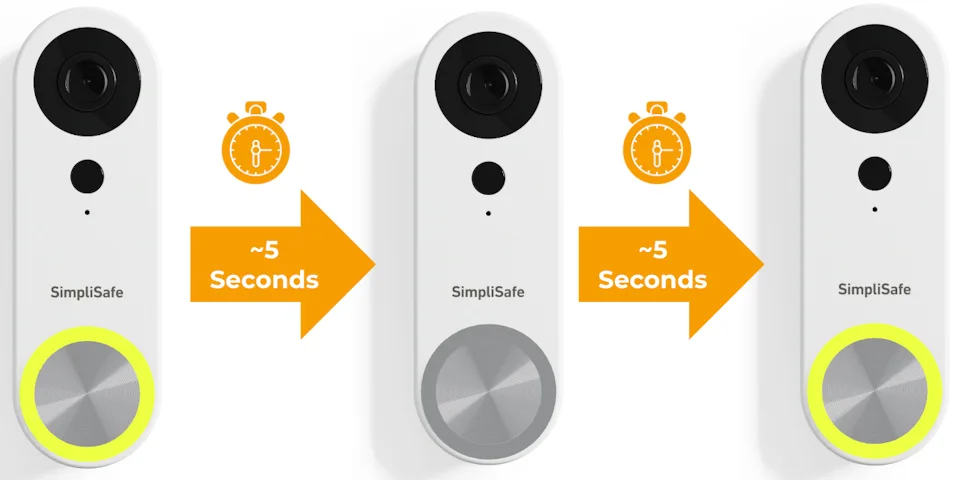
Your Video Doorbell Pro is equipped with a ring light around the doorbell button, to alert you to various statuses for your doorbell. In this scenario, you’ll see the LED turn yellow for about 5 seconds, then turn off for another 5 seconds - all while repeating this sequence.
Confirm your Doorbell’s Wiring Meets our Requirements
As a first step, you’ll want to confirm that the wiring for your location’s doorbell remains unchanged. Ensure that you have a mechanical chime, and that your transformer is rated for 8-24 volts. Remember, these are a strict requirement for the Video Doorbell Pro (opens in new tab). If you made any changes to your chime or got a new transformer, confirm that they still meet our requirements or contact a licensed electrician for further assistance.
Perform a Soft Reset on the Video Doorbell Pro
If your home or business meets the requirements for Video Doorbell Pro, as a next step you’ll perform a soft reset on the device to attempt to clear the unresponsive state and get it up and running again.
How to Perform a Soft Reset on the Video Doorbell Pro:
Using a T5 Torx Screwdriver (included with your Video Doorbell Pro), remove the security screw from the bottom of the Video Doorbell Pro to take off the faceplate
Press and release the larger button on the back of the Video Doorbell Pro
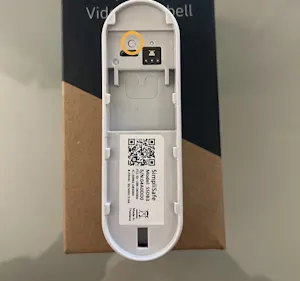
Secure the Video Doorbell Pro back onto its mounting plate by placing the faceplate back onto the device and reinserting the security screw
The light should turn solid yellow, followed by flashing white with audio cues - indicating that it’s ready for set up
The Video Doorbell Pro may need to be reinstalled (opens in new tab) using the SimpliSafe® Mobile App (opens in new tab)
Still Need Help?
If you require further assistance, our support team is here to help (opens in new tab).