
Testing the Smoke and Carbon Monoxide Alarm Listener
To confirm that the Smoke & Carbon Monoxide Alarm Listener can hear your Base Station and third-party detectors, you can put the Alarm Listener into Test Mode and trigger a test alarm.
How to Test the Alarm Listener
To put your Alarm Listener into Test Mode, press and hold the Test Button on the front of the Alarm Listener for 5 seconds. You will then see a solid red LED light on the front face of the Alarm Listener, near the test button. This light is confirmation that the device is in Test Mode.
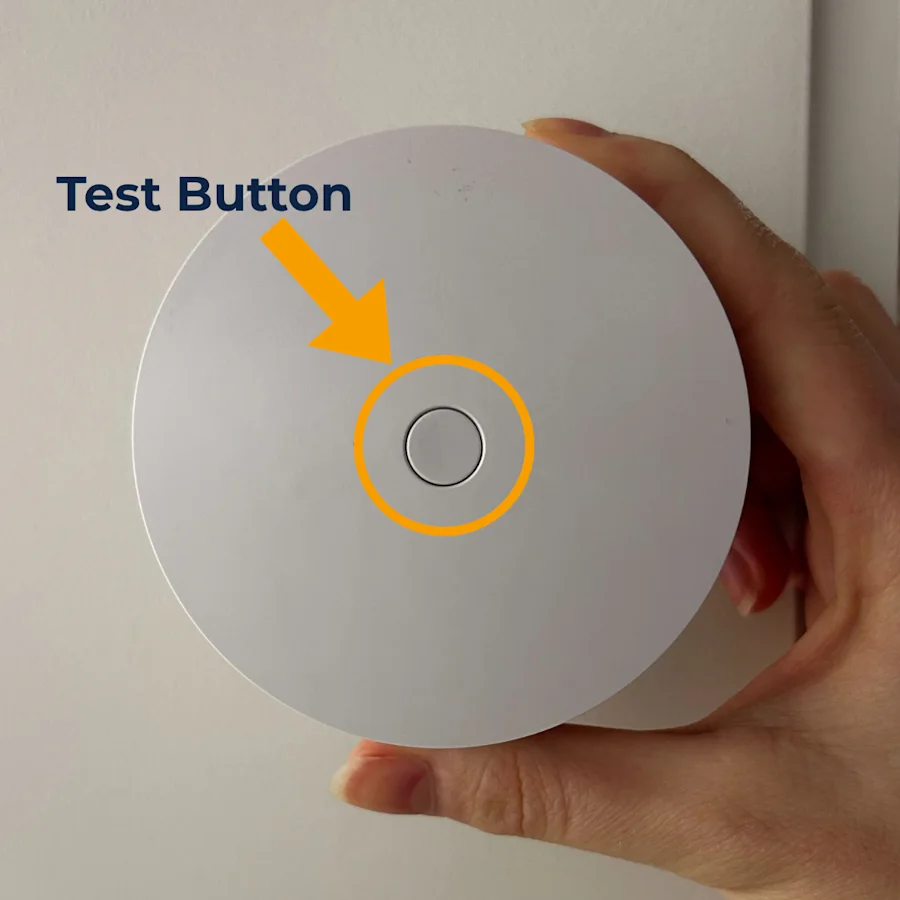
Initiate a test alarm on your third-party smoke, CO, or smoke/CO detector (not the Alarm Listener) by pressing and holding its test button for at least 30 seconds—this gives the Alarm Listener time to time to identify and learn the third-party detector's signal sound pattern.
While holding the test button down on the third-party detector, the device itself should sound its alarm sequence for the 30 seconds. For smoke alarms, you will hear the detector’s tri-tone sequence, and for CO alarms you will hear the four-tone sequence.
The Base Station will also announce “Smoke and Carbon Monoxide Alarm Listener,” confirming a successful connection between the Alarm Listener, Base Station, and third-party detectors.
Once the test is complete, press and hold the test button on the Alarm Listener for 5 seconds. The red light on the front face of the Alarm Listener will turn off, exiting the device from Test Mode. If you do not press the test button to leave Test Mode, the Alarm Listener will automatically leave after 20 minutes.
Troubleshooting the Alarm Listener
Confirm That There Is a Red Light on the Alarm Listener
If you are having trouble testing your Alarm Listener, first make sure that there is a solid red LED light on the front face of the device. If there is not, press and hold the test button for 5 seconds.
If the red light does not appear, replace the Alarm Listener’s battery (opens in new tab). The Alarm Listener takes one CR123A lithium 3 volt battery and has a life expectancy of up to 3 years, depending on placement and usage.
Make Sure the Alarm Listener is Paired to the Base Station
If the Alarm Listener is not paired to your SimpliSafe® system, it will not respond during a test sequence. To confirm whether your Alarm Listener is connected to your system, cross-reference the serial number printed on the Alarm Listener with the devices that you see in the SimpliSafe® Mobile App.
To locate the Alarm Listener’s serial number, twist the device counterclockwise off its bracket to reveal its battery. The serial number is the first line of numbers and letters located directly below the QR code.
Once you have located the serial number printed on your Alarm Listener, you will need to cross-reference it with the serial number of your Alarm Listener(s) paired in your SimpliSafe® app.
Open the SimpliSafe® app on your phone or tablet
Choose My System from the navigation bar at the bottom of the screen
Select Device Settings
Tap on your Alarm Listener
Scroll down to Basic Info
Review the serial number displayed in the app and check if it matches the number printed on your device
If you have multiple Alarm Listeners paired to your system, complete steps 4-6 for every device until you find one that matches your serial number
If none of the Alarm Listeners in the SimpliSafe® app have a serial number that matches the number printed on your device, that indicates that this specific Alarm Listener is not paired to your system. In this case, refer to our Smoke and Carbon Monoxide Alarm Listener Overview and Installation Guide (opens in new tab) to learn more about adding the device to your system.
However, if this Alarm Listener is paired to your system, continue with the troubleshooting steps below.
Check the Base Station’s Voice Prompts Setting
If you did not hear the Base Station say “Smoke & Carbon Monoxide Alarm Listener” when testing the device, check your Base Station’s settings to see if the Voice Prompts are turned on. When turned off, the Base Station will not make any audible confirmations during Test Mode.
To review this setting:
Open the SimpliSafe® mobile app
Select My System from the navigation bar at the bottom of the screen
Choose Base Station Settings
Select Audio Alerts
Adjust the Voice Prompts setting to your desired volume
Press Save in the upper right corner of the screen when you are done
Confirm That Your Third-Party Detectors are UL-Compliant
If the Alarm Listener is in Test Mode but did not respond to your third-party smoke or CO detector’s test alarm, you will want to make sure that your detectors are UL-compliant and audibly alarm. The Alarm Listener works by listening for audible alarm sounds and will not work with detectors that do not audibly alarm. To check if your third-party detectors are UL-compliant, look at the detector itself. The compliance code for smoke detectors is UL 217, and the compliance code for CO detectors is UL 2034.
Check the Placement of the Alarm Listener
If the Alarm Listener is installed incorrectly, that can prevent it from hearing your third-party detector’s alarms. The Alarm Listener must be installed within 4 inches of the third-party detector you want it to listen to, and the Alarm Listener’s microphone grate must be facing the detector.
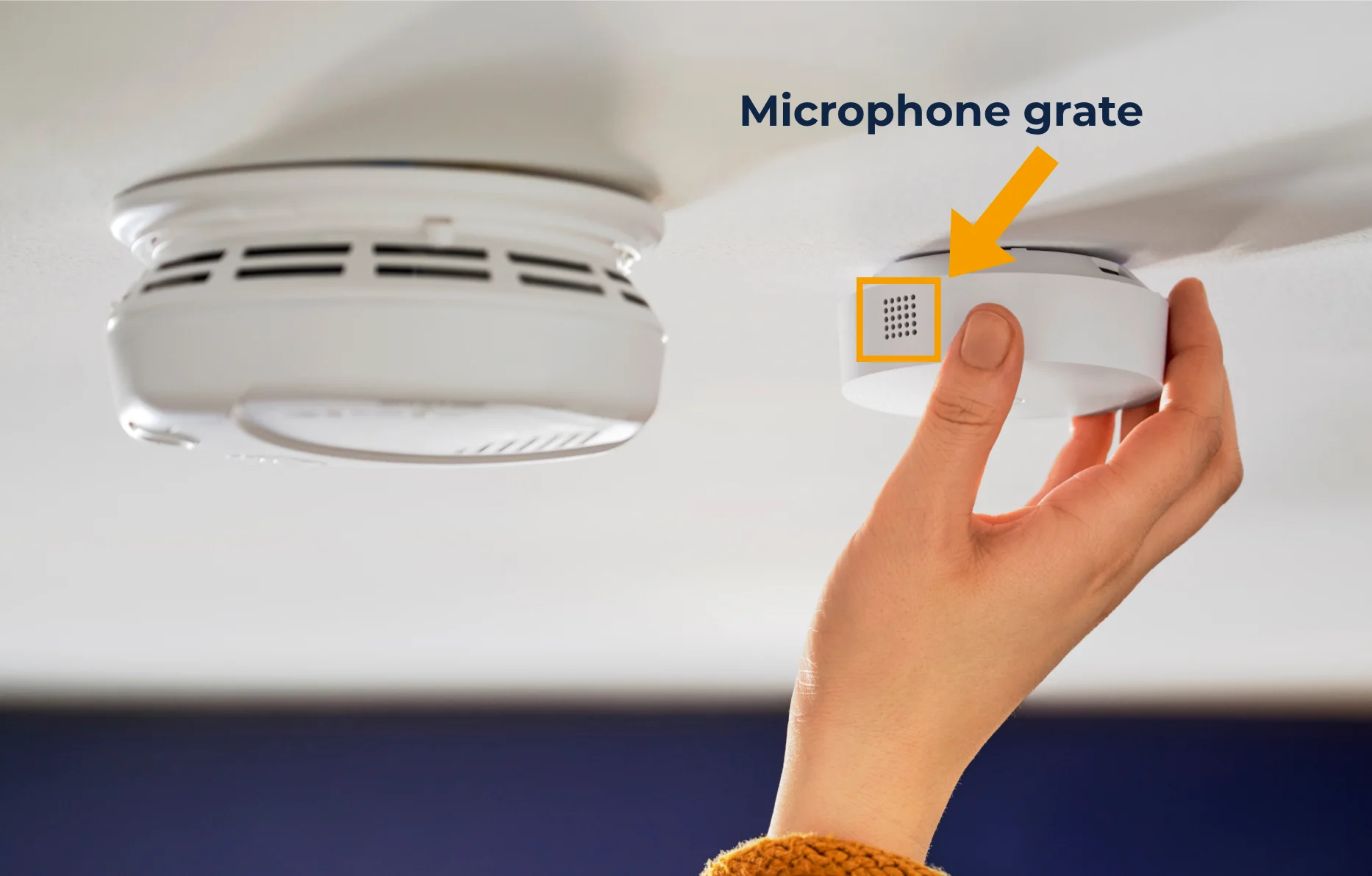
Check the physical setup of your Alarm Listener, and if it doesn’t align with the requirements above, please reinstall it. For more information, see the Smoke and Carbon Monoxide Alarm Listener Overview and Installation Guide (opens in new tab).
Move the Base Station
Finally, you’ll want to ensure that the Base Station is centrally located (opens in new tab) within your home, and free from any neighboring wireless devices. We recommend having the Base Station elevated at least 3 feet off the ground on a non-dense surface, like glass or wood. We also recommend avoiding placing the Base Station within a cabinet or enclosed space, as this can weaken its connection with other devices.