
How to Find the Serial Number for Your SimpliSafe® Device or Camera
During troubleshooting or for account verification purposes, you may be required to identify the serial number for a product within your system. You can easily find the serial number for your devices or cameras within the SimpliSafe® Mobile App.
Locating the Serial Number for your Base Station in the SimpliSafe® App
Open the SimpliSafe® Mobile App (opens in new tab) on your phone or tablet
Tap on the three-bar menu (hamburger menu) in the upper left corner of the app screen
At the top of the menu you’ll see an Account Number
This is the serial number for your Base Station
Locating the Serial Number for your Devices or Cameras in the SimpliSafe® App
Open the SimpliSafe® Mobile App (opens in new tab) on your phone or tablet
Choose My System from the bottom navigation bar
Select either Devices (opens in new tab) or Cameras (opens in new tab) to continue
Tap on the Device or Camera you wish to manage
Scroll down to Basic Info
Your device or camera’s Serial Number will be listed here
There may be a point where you need to find the serial number on the physical device itself. The rest of the article will guide you through finding the serial number for each product. Click to expand the collapsible section for the product type you wish to learn more about.

The serial number for the Base Station can be found on the bottom of the unit, right underneath the QR code.

The serial number for the Keypad can be found underneath the battery cover, at the bottom of the device. Simply slide the Keypad off the bracket (battery cover), then turn it around and look towards the bottom of the battery compartment to see it. The serial number will be listed above the manufacturing date.

The serial number for the Key Fob is found on the tab at the bottom of the device. Flip the Key Fob over so its back is facing you and look at the tab to find its number.
Entry Sensor
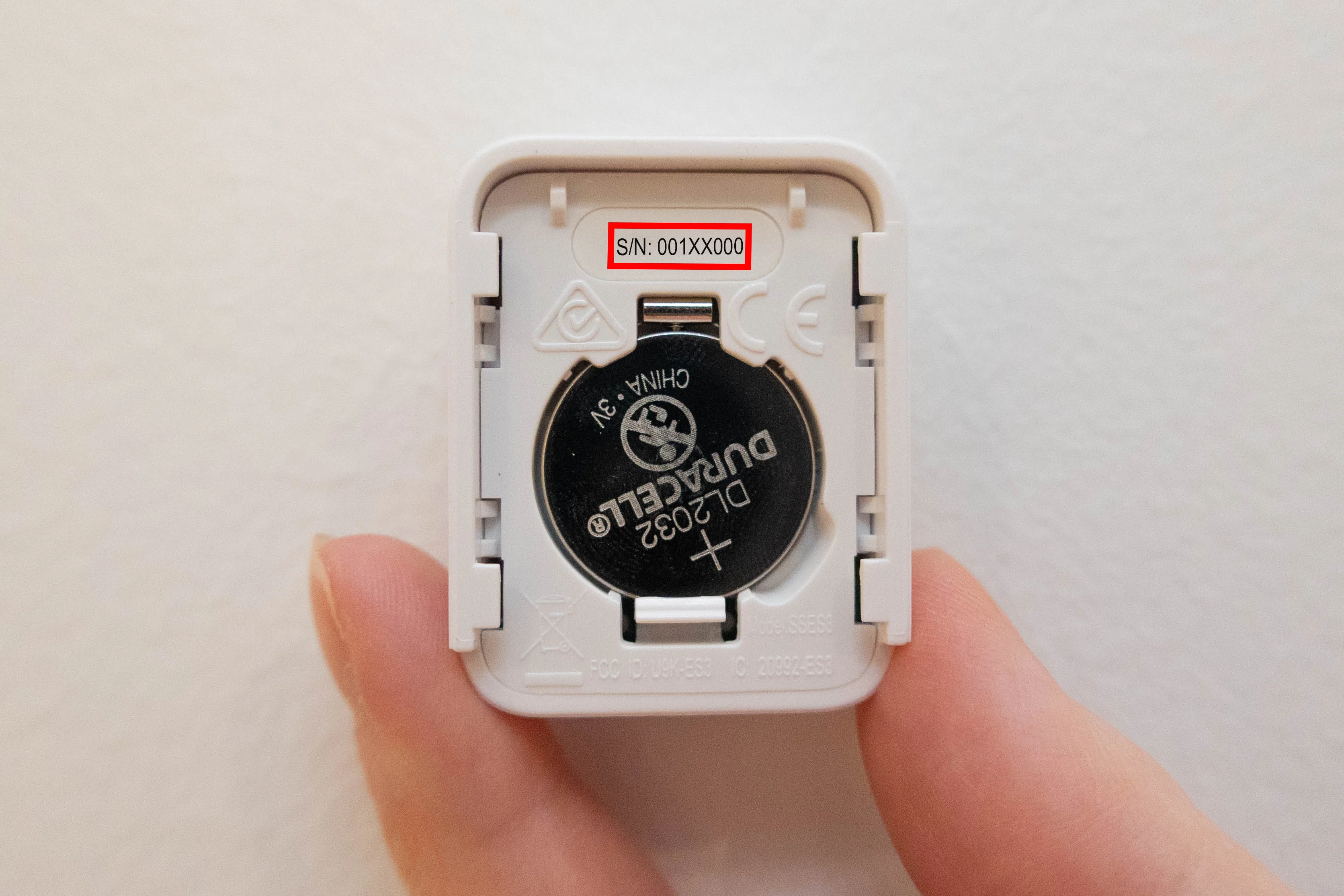
To find the serial number on the Entry Sensor, simply remove the Entry Sensor from its bracket. To remove it from the bracket, locate the pairing button on the sensor, then slide the sensor up towards the button. Once the sensor has been removed from the bracket, look at the battery and the serial number will be right above it.
Motion Sensor Gen 1

The serial number for the Motion Sensor Gen 1 is located right above the sensitivity slider. To expose the battery compartment for viewing, gently grip the Motion Sensor and slide it up and off its bracket. You may need to wiggle it or use light force to push the sensor off the bracket. Once removed, look for the “sensitivity” embossed on the plastic. The serial number will be above it.
Motion Sensor Gen 2

The serial number for the Motion Sensor Gen 2 is located on the back side of the sensor in the upper right corner underneath the QR code. To locate it, remove the Motion Sensor Gen 2 from its’ bracket, by either wiggling it side to side then pushing up towards the pairing button. You may need to use light force to accomplish this. Once the battery is exposed, you’ll find the serial number in white text underneath the QR code.
Glassbreak Sensor

The serial number for the Glassbreak Sensor is located above the sensitivity slider on the back of the device. To expose this area and the battery compartment, simply slide the Glassbreak Sensor off its bracket by wiggling it back and forth then up towards the pairing button. You may need to use light force to accomplish this. Once exposed, locate “sensitivity” embossed in the plastic, and you’ll find the serial number right above that.
Panic Button

The serial number for the Panic Button is located within the battery compartment for the product. To expose the battery compartment, slide the front of the Panic Button up and off its bracket - being careful not to press the Panic Button during this process! Once exposed, you’ll find the serial number at the bottom of the device.
Extra Siren

The serial number for the Extra Siren can be found on the back of the device, underneath the bracket. To remove the Extra Siren from the bracket, simply slide it up and off the bracket. You may need to use light force to accomplish this. You do not need to remove the battery cover to see the serial number. You can find it at the bottom of the product, next to the QR code or in between the two screws at the bottom of the product.
Temperature Sensor

The serial number for the Temperature Sensor (Freeze Sensor) can be found within the battery compartment on the device. Simply slide the product off its bracket by wiggling it side to side then pushing up towards the pairing button on the product. You may need to use light force to accomplish this. Once the sensor is removed from its bracket, you can locate the serial number next to the QR code, at the bottom of the battery compartment.
Water Sensor

The serial number for the Water Sensor is within the battery compartment. To expose this, you’ll need to twist the Water Sensor base and top apart from one another, rotating it counterclockwise. Once they are separated, you’ll find the serial number below the battery, opposite of the QR code. If you need to reassemble the Water Sensor, line up the arrow on the top and bottom pieces, then twist them back together. They should seamlessly rotate to create a water-tight seal, so do not apply pressure or force them to go together if the arrows are not lined up.
Smoke & Carbon Monoxide Detector

The serial number for the Smoke & Carbon Monoxide Detector can be found on the back of the device, after removing it from its bracket. To remove the Smoke & CO Detector from its bracket, rotate the detector counterclockwise. The serial number will be to the right of the QR code, in white text on the black background, right above the manufacturing date.To reassemble the Smoke & CO Detector, twist the detector back onto the bracket moving it clockwise. It should click into place once secured. If it’s not fully attached to the bracket, it could result in a tampering error (opens in new tab), which can cause your Base Station to beep (opens in new tab) repeatedly, signifying the trouble signal. (opens in new tab)
Carbon Monoxide Detector

The serial number for the Carbon Monoxide Detector can be found on the back of the device, after removing it from its bracket. To remove the CO Detector from its bracket, rotate the detector counterclockwise. The serial number is right above the center of the device on the back of the product. You can find it by looking for “S/N:” followed by a string of letters and numbers.
To reassemble the CO Detector, twist the detector back onto the bracket moving it clockwise. It should click into place once secured. If it’s not fully attached to the bracket, it could result in a tampering error (opens in new tab), which can cause your Base Station to beep (opens in new tab) repeatedly, signifying the trouble signal (opens in new tab).
Smoke Detector
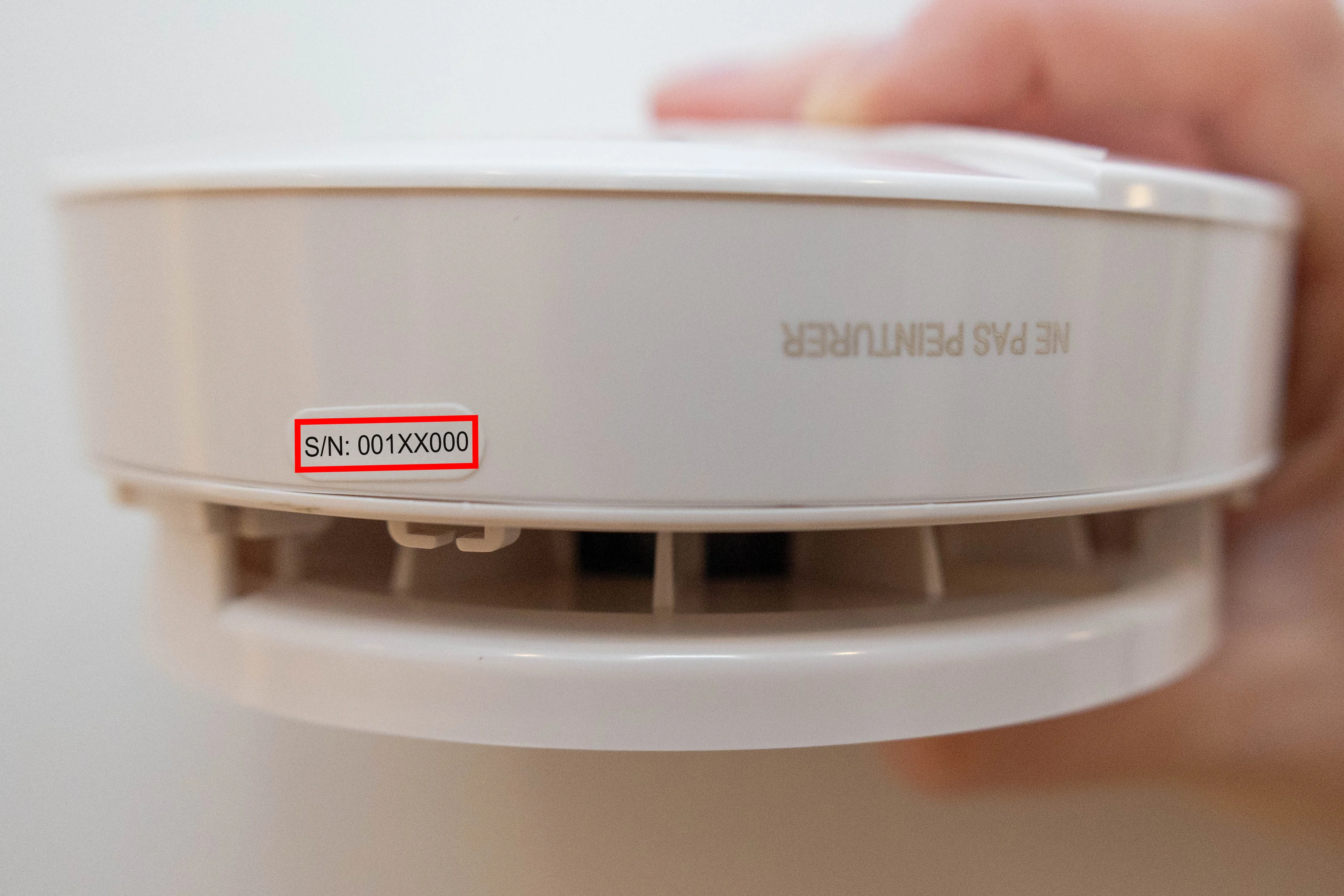
The serial number for the Smoke Detector can be found on the outside of the device, on a sticker that denotes “S/N:” followed by a string of numbers and letters. You may or may not need to remove the Smoke Detector from its bracket to view the serial number. If you need to remove it from its bracket, simply twist it counterclockwise.
To reassemble the Smoke Detector, twist the detector back onto the bracket moving it clockwise. It should click into place once secured. If it’s not fully attached to the bracket, it could result in a tampering error (opens in new tab), which can cause your Base Station to beep (opens in new tab) repeatedly, signifying the trouble signal (opens in new tab).
Video Doorbell Series 2
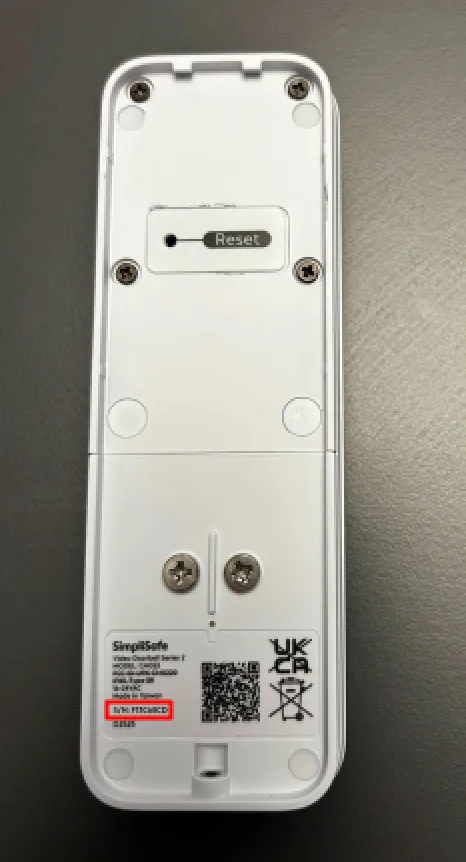
The serial number for the Video Doorbell Series 2 is on the back of the camera. To locate the serial number, you will need to remove the Video Doorbell off its mounting bracket. Using the included security tool, remove the security screw on the bottom of the device and lift the Video Doorbell up and off its mounting bracket. Next, flip the Video Doorbell around so its back is facing up. You’ll find the serial number on the bottom left corner of the Video Doorbell, next the the QR code.
Outdoor Camera Series 2

The serial number for the Outdoor Camera Series 2 is located on the back of the camera lens (or cap, as we call it). To remove the lens from the body of the camera, simply rotate the cap clockwise. Then, turn over the cap to expose the product information. You’ll find the serial number underneath the QR code, in white text on the black background.
Outdoor Camera

The serial number for the Outdoor Camera is located on the back of the camera lens (or cap, as we call it). To remove the lens from the body of the camera, simply rotate the cap clockwise. Then, turn over the cap to expose the product information. You’ll find the serial number to the left of the QR code, in white text on the black background.
Video Doorbell Pro
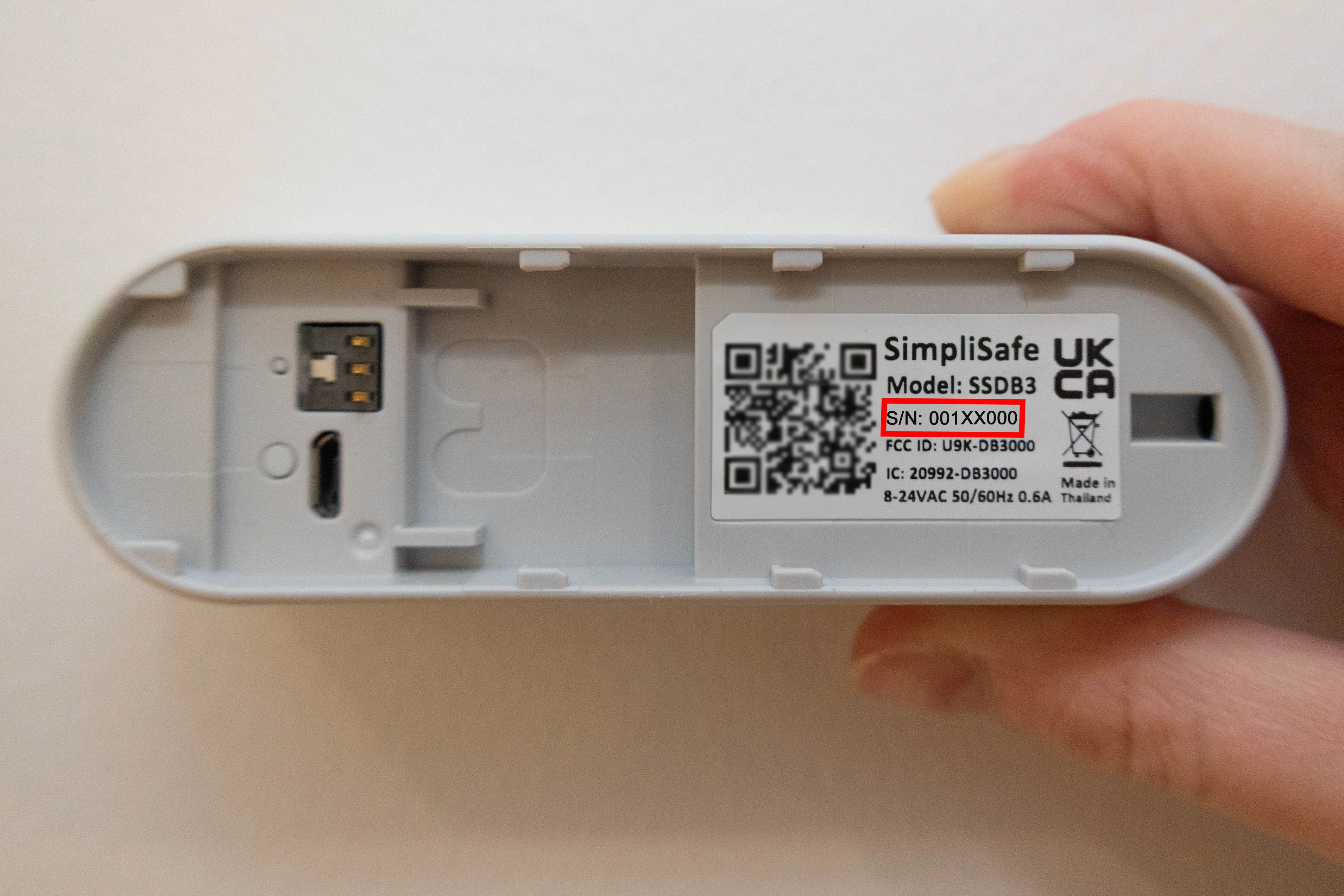
The serial number for the Video Doorbell Pro can be found on the back of the device. To remove the Video Doorbell Pro to expose the serial number, you’ll need to remove the security screw from the bottom of the device, using a T5 Torx Screwdriver. Once the screw has been removed, gently remove the Video Doorbell Pro faceplate from the bracket. Flip the camera over, and you’ll find the serial number underneath the Model Number, just to the right of the QR code.
Smart Alarm Wireless Indoor Security Camera

The serial number on the Smart Alarm Wireless Indoor Security Camera can be found on the backside of the camera, right underneath the QR code.
SimpliCam® Wired Indoor Security Camera

The serial number for the SimpliCam® Wired Indoor Security Camera can be found on the back of the SimpliCam®. There is a white sticker towards the top, and you’ll find the serial number underneath the Model Number to the right of the QR code.
Smart Lock Series 2

The serial number on the Smart Lock Series 2 can be found right above the battery compartment on the back of the Smart Lock. This is the part that is inside of your home or business, not outside of your door. To access it, slide the battery cover to the right to remove it. Then, locate the serial number in the center on the upper portion of the back of the Smart Lock itself.
Smart Lock

The serial number on the Smart Lock can be found on the back of the Smart Lock itself, the piece that goes inside your door. To remove this, you’ll need to use the included Release Tool. If you no longer have the release tool, you can always use a small flathead screwdriver, similar to one you would find in an eyeglass kit.
To remove the Smart Lock:
Using the Release Tool (or a small flathead screwdriver) slide out the two wing latches on each side of the device
After sliding out the wing latches, you can pull the Smart Lock off the door.
Once removed, you’ll find the serial number in the center right above the wing latches, right underneath the FCC ID embossed section.
When it comes time to place the Smart Lock back on your door, refer to our Smart Lock Installation Guide (opens in new tab) on the Help Center.