
How to Reset the Wireless Outdoor Security Camera
If your Wireless Outdoor Security Camera encounters an error that can’t be fixed through normal troubleshooting, performing a factory reset* of the camera may be necessary.
*Please note that you cannot reset the Outdoor Camera remotely. You must be with your camera physically to reset it.
First, you’ll need to remove the Outdoor Camera from the SimpliSafe® Mobile App.
To remove your Outdoor Camera
Open the SimpliSafe® Mobile App (opens in new tab) on your phone or tablet
Choose My System from the bottom navigation bar
Tap your Outdoor Camera
Scroll to the bottom and select Remove Camera
Once the Outdoor Camera has been removed from your system, you’ll need to reset it.
To reset your Outdoor Camera
Locate the pairing button on the back of your Outdoor Camera
This is the smaller, circular button on the back of the camera
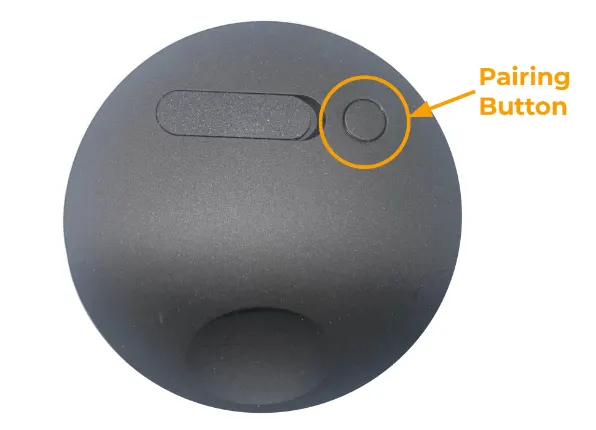
Press and hold the pairing button firmly, using both thumbs if possible, for 30 seconds - or until the camera chimes
If the camera does not chime at any point during the 30 seconds of pressing the button, let go and press and hold the button again for another 30 seconds
When you release the button, the camera should reboot and begin to flash white
For some cameras you may also notice it make a sound
Once the reset is complete, you can set it back up using our Installation Guide (opens in new tab).